"I'm working in a large company
and we use PDF format widely to publish our manuals
and catalogs electronically.
Before utilizing ParmisPDF I never thought I would
see the day where I could free myself of Adobe Acrobat.
ParmisPDF is amazing fast and easy to use. ParmisPDF
Professional batch operation feature did its job
perfectly. It performed a list of operations on
our PDF documents nicely and much more easier and
faster than Adobe Acrobat.
ParmisPDF presents a winning combination of functionality
and value." Annabel Claudel
"Just downloaded ParmisPDF and
I wondered how you packed so much into the new version
especially considering the small size of the application.
I switched to ParmisPDF when I found out ParmisPDF
covers all our needs and can execute all operations
with an amazing speed and great results." Robert Medlin
You can find in this page:
Command Line
PDF watermark, Command Line PDF Background,
Command Line PDF bates
numbering (pdf bates stamping), Command Line
PDF stamping,
Command Line adding
header and footer to PDF files, Command Line PDF
password adding, Command Line PDF setting permissions,
high performance PDF command line tool, Command Line pdf remove
permissions, Command Line inserting attachment to PDFs,
Command Line
digital signing PDFs, Command Line PDF setting permissions
(commenting, print, edit, copy, extract, delete & etc),
Command Line adding password to PDFs, PDF batch command
line software, Command Line PDFs encryption, commad line
pdf for developers
PDF
Command Line Processing
Tutorial
Learn how process PDF
files with Command
Line software
With
ParmisPDF
command line you can apply a number of routine sets of
commands to
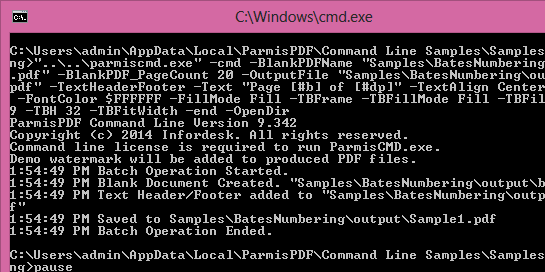
multiple PDF files,Command Line sequence is a defined series of commands with specific settings and in a specific order that you apply in a single step.
Command
Line
adding
watermark
to PDF
files
Command
Line
adding
stamp to
PDF
files
Command
Line
adding
header/footer
to PDF
files
Command
Line
setting
PDF
files
permissions
(print,
commenting,
edit,
copy &
etc)
Command
Line
merging
PDF
files
Command
Line
adding
pages to
PDF
files
Command
Line
find &
replace
text in
PDF
files
Command
Line set
PDF
documents
title
Command
Line set
PDF
documents
company
Command
Line
remove
objects
in PDF
files
Command
Line
remove
bookmarks
in PDF
files
Command
Line
remove
pages
thumbnails
in PDF
files
Command
Line
adding
Background
to PDF
files
Command
Line
adding
dynamic
stamp to
PDF
files
Command
Line
adding
attachment
to PDF
files
Command
Line
adding
password
to PDF
files
Command
Line
extracting
pages of
PDF
files
Command
Line
flatten
PDF
files
forms
Command
Line
find
text &
replace
with
image in
PDF
files
Command
Line set
PDF
documents
author
Command
Line set
PDF
documents
keywords
Command
Line
remove
annotations
in PDF
files
Command
Line
remove
Javascripts
in PDF
files
Command
Line
remove
pages
labels
in PDF
files
Command
Line PDF
bates
numbering
(stamping)
Command
Line
adding
custom
stamps
to PDF
files
Command
Line
signing
PDF
files
Command
Line PDF
files
encryption
Command
Line
deleting
pages of
PDF
files
Command
Line
flatten
PDF
files
annotations
Command
Line set
PDF
documents
meta
information
Command
Line set
PDF
documents
subject
Command
Line
clean up
of PDF
files
Command
Line
remove
stamps
in PDF
files
Command
Line
remove
Embedded
files in
PDF
files
Command
Line
remove
contents
in PDF
files
Please
click here
to download
the latest
version of
ParmisPDF.
Command Line PDF, Command Line PDF
Processing,
Command Line pdf signature, Command Line remove bookmarks in PDFs, Command
Line PDF
security setting, Command Line remove Javascripts
in PDFs. Command Line PDF stamping,
Command Line adding
header/footer to
PDF documents, Command Line PDF password adding,
Command Line remove contents in PDFs, Command Line remove Embeddeds in PDFs,
Command Line remove pages thumbnails in PDFs, Command
Line PDF
protection. Command Line add watermark to PDF, Command Line add stamp,
, Command Line Remove PDF javascript, ,
Command Line
Set PDf meta tags, Command Line set PDF document information,
Use Command Line Operation tool for page label,
Command Line replacing
text from PDF, Command Line remove PDF document objects,
Command Line flatten form, Command Line flatten annotations, Command Line PDF setting permissions, Command
Line pdf remove
permissions, Command Line inserting attachment
to PDFs, Command Line digital signing PDFs,
Command Line setting PDFs permissions (commenting,
print, edit, copy, extract, delete & etc),
Command Line
adding password to PDFs, Command Line
insert dynamic stamp, Command Line add annotation,
Command Line
add attachment to pdf files, Command Line add header to pdf,
Command Line insert footer to PDF, Command Line set Pdf files
security settings,
Command Line merge pdf files,
Command Line
remove pdf password,
Command Line delete passwords of PDf
files, Command
Line remove PDF restrictions, Command Line Extract
PDF pages, Command Line Append PDF page, Command
Line insert pages
to PDF, Command Line set PDF subject, Command
Line set PDF company, Command Line set PDF
keywords, Command Line clean up of PDFs, Command Line remove objects in PDFs,
Command Line
remove annotations in PDFs, Command Line remove stamps
in PDFs, Command Line remove pages labels in PDFs,
Command Line PDF watermark, Command Line PDF Background,
Command Line PDF bates numbering (stamping), Command Line delete page from PDF,
Command Line Extract
page from PDF, Command Line Extract pdf attachments,
Command Line
add javascript to PDF, Command Line add JavaScript actions
to PDF files, Command Line PDFs encryption,
Command Line merging PDFs, Command Line extracting
pages of PDFs,
Command Line deleting pages of PDFs, Command
Line adding pages
to PDFs, Command Line flatten PDFs forms,
Command Line flatten PDFs annotations,
Command Line find & replace text in PDFs,
Command Line
find text & replace with image in PDFs,
Command Line
set PDF documents meta information, Command Line set
PDF documents title, Command Line set PDF documents
author