"I'm working in a large company
and we use PDF format widely to publish our manuals
and catalogs electronically.
Before utilizing ParmisPDF I never thought I would
see the day where I could free myself of Adobe Acrobat.
ParmisPDF is amazing fast and easy to use. ParmisPDF
Professional batch operation feature did its job
perfectly. It performed a list of operations on
our PDF documents nicely and much more easier and
faster than Adobe Acrobat.
ParmisPDF presents a winning combination of functionality
and value." Annabel Claudel
"Just downloaded ParmisPDF and
I wondered how you packed so much into the new version
especially considering the small size of the application.
I switched to ParmisPDF when I found out ParmisPDF
covers all our needs and can execute all operations
with an amazing speed and great results." Robert Medlin
You can find in this page:
command line bates numbering PDF, command-line
bates numbering multiple PDF documents, command line PDF
doc bates numbering,
command line pdf suite, bate numbering adobe pdf
files with command line, command line PDF bates
numbering, command line software for PDF bates
numbering, dynamic pdf bates numbering, page
numbering pdf files with command line,
add file name to PDF with
command line, add date onto PDF documents with
command line, insert suffix and prefix bates numbering
PDF documents with command line, command line add time
to PDF, bates numbering PDFs with command prompt,
command-line pdf bates numberer, automatic pdf bates
numbering with command line, automatic pdf bates
numbering software
Command Line
PDF Bates Numbering
Bates numbering a huge
number of PDFs with
ParmisPDF command line
is a comprehensive and
powerful PDF tool which
allows the batch
processing of a large
number of PDF files at
the same time.
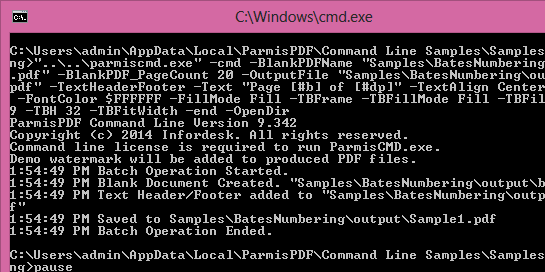
With ParmisPDF command
line bates numbering
function you can bates
number to a huge number
of PDF documents in
folders and subfolders
quickly and easily.
ParmisPDF allow you to
set command line
settings and create
command files easily
through a very simple
and clear graphical user
interface without having
any programming
knowledge.
Bates numbering
multiple PDF
files at the same
times with command
line
Create command file
quickly and easily
through a clear and
simple graphical
user interface
Adding unlimited
number of
bates stamps per
one page
with command line
Adding multi-line
bates stamps with unlimited
number of
the stamp
elements:
Static text
elements: Adding
suffix and
prefix to bates
stamps such as
company name,
address, email
and etc.
Dynamic text
elements: Case
number,
Reference
number, Page
number, Total
pages, Date,
Time, Author
name, File name
and etc.
Numbering styles:
Numeric
Alphabetical:
Upper/Lower case
Roman Numerals:
Upper/Lower case
Arabic Numbers
Set input
folders/files
Set output location
& renaming
Set alignment in
command file
Set angle (rotation)
in command file
Set background for
bates stamp in
command file
Set
increments
value (step)
in command file
Set
increments
frequency
(repeat) in
command file
Set starting
value
of
increments
in command file
Run multiple batch
projects (command
files) at the same
time using batch
file (.bat)
Run command file in
silent mode (ideal
for developers)
Looking for a flexible
and easy to use command
line PDF utility?
ParmisPDF is a perfect
solution for bates
numbering a large number
of PDF documents with
command line.
Please
click here
to download
the latest
version of
ParmisPDF.
command line PDF
utility, command-line bates numbering,
bates numbering
PDF documents with command-line, bates
numbering command file, create command
file for bates numbering,
command line tool for bates numbering PDF files,
bates numbering PDFs with command line software,
software for adding bates numbers to PDF
documents with command line, command line
PDF software,
command line
adding bates numbers to a large number of
PDF documents, command line PDF bates stamping,
PDF bates stamping developer kit, PDF bates
stamping SDK, bates numbering PDFs with
command-line,
command-line PDF document bates numbering
software, how bates numbering PDF files with
command line, shell pdf bates numbering, dos
shell pdf bates numbering, command line pdf
bates stamper